How to move from Prompt to Context Engineering (With demo code).
Why tweaking your system prompts is no longer enough—and how to build agents that actually remember.
For three years, we believed the secret to AI was in the “magic words.” We spent hours tweaking adjectives, adding “think step-by-step,” and begging models to “act as a senior developer”. But as we moved to autonomous agents that can run for hours, the “perfect prompt” started to break.
The industry has hit the Prompting Ceiling: a point where no matter how well you word your instruction, the agent eventually “rots”—losing its place, hallucinating, or failing to use tools correctly because its history has become an unmanageable mess. If you are still focusing primarily on the prompt, you aren’t engineering the intelligence; you’re just whispering to the CPU. In 2026, the elite are moving toward Context Engineering.
The real gap in modern AI development isn’t about finding better models or writing cleverer prompts. The shift now is to Context Engineering.
What Context Engineering Actually Is
If prompt engineering is about what you ask, Context Engineering is about what the model knows when you ask it.
Context engineering is the systematic design and management of everything the model sees before it answers—memory, tools, user state, retrieved docs, policies—not just the prompt string. It treats the context window not as a static text box, but as a dynamic, modular runtime environment.
The OS Analogy: Think of the LLM as the CPU and the context window as RAM. Prompt engineering is like writing a single command. Context engineering is building the Operating System that manages what data is loaded into that RAM, when it’s swapped out, and how “peripherals” (tools/APIs) interact with it.
Context as a Compiler: Researchers now treat the LLM as a compiler that translates ambiguous human intent into executable actions. For this “compilation” to work, the model needs more than just a request; it needs the right “libraries”—your proprietary data, conversation history, and real-time state.
Let’s break down the difference:
Feature Prompt Engineering Context Engineering Focus Crafting the perfect instructions Managing the information environment State Stateless (relies entirely on the current prompt) Stateful (maintains memory across turns) Architecture Monolithic text strings Modular, progressive disclosure Tooling Hardcoded tool descriptions in the prompt MCP schemas, dynamic tool loading Scaling Fails as context grows (Lost in the Middle) Compresses and routes to stay efficient
In 2026, the best engineers aren’t prompt experts—they’re context architects. The model’s intelligence is increasingly limited by what you let it see, not its raw capability.
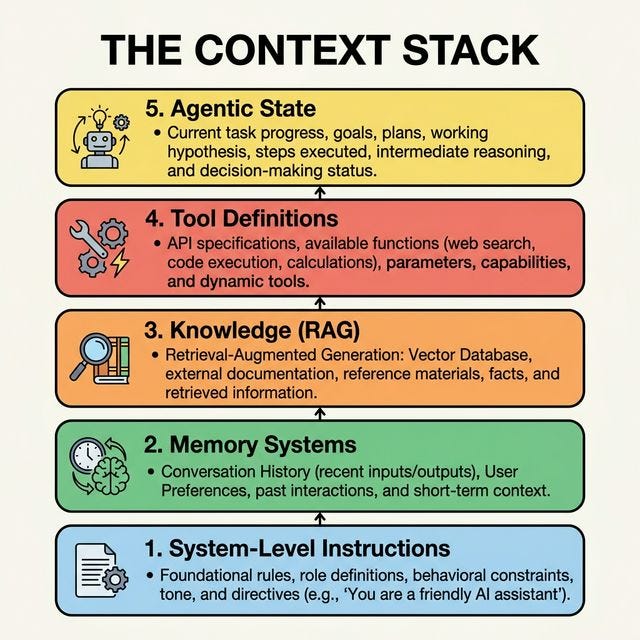
The Breakdown of the 2026 “Context Stack”:
System-Level Instructions: Foundational rules and personas.
Memory Systems: Both short-term (thread state) and long-term (persistence facts).
Knowledge (RAG): Dynamically retrieved external data.
Tool Definitions: Descriptions of available APIs/Functions.
Agentic State: The current plan, scratchpads, and reasoning history.
A look at the layered architecture of the 5-layer context stack, separating progressive disclosure from evaluation.
What Changed: 2025 vs 2026
When the term “Context Engineering” first exploded in mid-2025 (thanks to Andrej Karpathy’s framing and early Anthropic posts), it was mostly a fancy way of saying “add RAG and a scratchpad.” But simply dumping vector search results into a prompt didn’t solve the core issue of context bloat and declining accuracy over long sessions.
The 2026 reality is entirely different. We’ve moved from static prompt injection to dynamic runtime assembly. To master Context Engineering in 2026, you must apply five core patterns used by production systems:
Progressive Disclosure: Instead of loading every possible tool and rule upfront, context architectures now load only what is needed for the current step. Rather than stuffing the prompt, you progressively reveal context as the task demands it, keeping the LLM laser-focused on the immediate micro-task.
Context Routing: Directing queries to the right contextual components (Rule-based, LLM-based, or Hybrid) before hitting the main generation model. This ensures that a specialized sub-task queries its own localized memory or toolset rather than the global state.
Context Reduction (Compaction vs. Summarization): Shrinking accumulated history to prevent context rot.
Compaction (Reversible): Stripping details that can be found elsewhere. Example: Instead of keeping the full text of a 10MB file in the chat, the agent only sees the file path. It can “read” the file again if it needs to, but the active window stays lean.
Summarization (Irreversible): When history hits a “pre-rot” threshold, old turns are summarized into a structured schema (JSON/Markdown) to preserve the “intent” without the “noise”.
Context Isolation (Quarantining): Don’t give every sub-agent the whole story. Use Context Isolation to give a “Researcher Agent” only the search results and a “Writer Agent” only the final outline. This prevents “Context Confusion”—where a model gets distracted by irrelevant tool outputs from previous steps.
Layered Action Space (Tool Offloading): Stop putting 50 tool definitions into your prompt. Use a Layered Space:
Level 1 (Direct Functions): Core atomic tools (File Read/Write).
Level 2 (Sandbox Utilities): Complex tools accessed via a Shell command.
Level 3 (APIs/Scripts): The agent writes and runs a Python script to handle massive data, returning only the result to the context window.
Real Use Case: Where Context Engineering Moves the Needle
The concept sounds great in theory, but where do you actually apply this? The resources I’ve referenced barely touch practical implementation. So let me show you exactly what happens when you build the same agent both ways — and where the gap comes from.
The Scenario: Autonomous Bug-Fixing Agent
Same task, two architectures. Given a Python codebase with bugs scattered across multiple files, fix everything until all tests pass — no human in the loop.
We’ll run this on two codebases: a small Expense Tracker (7 files, 6 bugs) and a larger Invoice Management System (15 files, 11 bugs). The full demo is here — clone it, set your API key, and run it yourself.
How Each Agent Actually Works
Before the results, you need to see the structural difference. These aren’t the same agent with tweaked prompts — they have fundamentally different control flows.
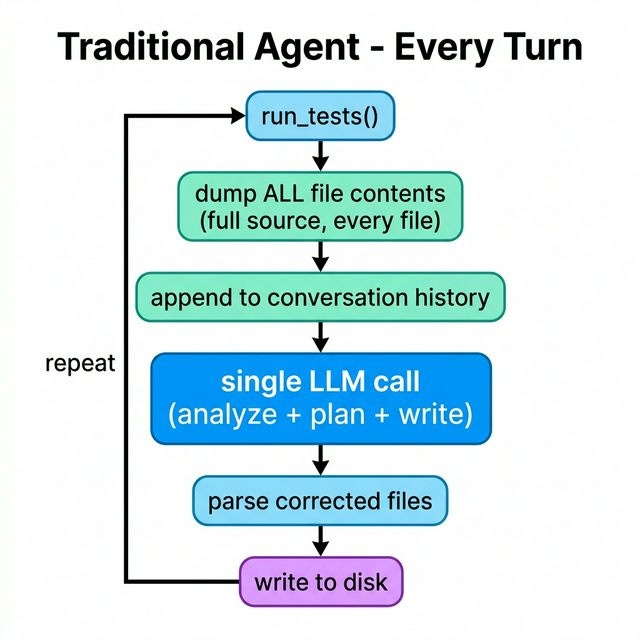
Traditional Agent — every turn:
Context-Engineered Agent — every cycle:
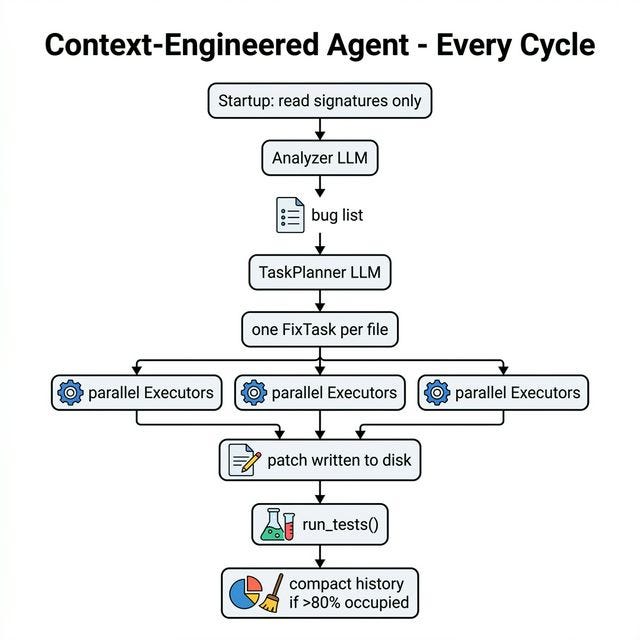
The Traditional agent does one thing per turn: dump everything and hope. The Context-Engineered agent routes each concern to the right specialist with the minimum context it needs. Let’s trace all five patterns through the code.
Pattern 1 — Progressive Disclosure
The problem in agent_traditional.py:
def _build_full_context(files):
    for path in files:
        content = read_file(path)          # full file, every file, every turn
        file_dump += f"### {path}\n{content}"
    return file_dump                       # ~8,000 tokens for 15 files
This runs at the top of every turn. The LLM is reading the same 15 files from scratch each time, including files it already fixed two turns ago.
The fix in planner.py:
# Once at startup — signatures only
for path in files:
    sigs = read_file_signatures(path)  # class/def lines, no body
    file_signatures[path] = sigs       # ~400 tokens for 15 files vs ~8,000

log.context_slice("Planner", f"signatures for {len(files)} files", total_sig_chars)
read_file_signatures() extracts only the structural skeleton of each file. The Planner never reads full file content. If it needs the full source, that’s the Executor’s job — on-demand, scoped to one file.
Pattern 2 — Context Routing
The problem: The Traditional agent uses one LLM call per turn to do everything: identify which bug to fix, reason about the fix, write the corrected code, and track what’s been done. That’s four distinct jobs with different information needs crammed into one context.
The fix is in planner.py, where each concern gets its own agent with its own scoped context:
# Step 1: Analyzer — only needs test output + signatures
bug_list = analyze_all(analyzer_llm, test_result["output"], file_signatures)

# Step 2: TaskPlanner — only needs bug list + signatures, groups by file
fix_tasks = plan_tasks(planner_llm, bug_list, file_signatures)

# Step 3: Executors — each gets one file + bug descriptions (see Pattern 3)
exec_results = _execute_parallel(fix_tasks, executor_llm)
Each LLM call is focused. The Analyzer has never seen file content — just signatures and failing test output. The TaskPlanner has never seen a file either — just the bug list. Only the Executor reads real code, and only the file it’s about to change.
Pattern 3 — Context Isolation
The problem: In the Traditional agent, by turn 4 the LLM’s context contains partial fixes from turn 2, test output from turn 1, the full source of files it already patched, and growing confusion about what state the code is in. This is context confusion.
The fix is in executor.py. Each Executor worker’s entire world is:
prompt = (
    f"File to fix: {task.target_file}\n\n"
    f"Current content:\n```python\n{file_content}\n```\n\n"
    f"Bugs to fix ({len(task.bugs)} total):\n{bugs_block}"
    # ← that’s it. No other files. No test history. No prior agent turns.
)
No conversation history. No other files. No awareness of what other workers are doing in parallel. The boundary is hard — by design.
The console output makes this explicit in every run:
Executor Isolation
🗂️ T1 Worker →
apps/invoices/models.py(Fixes 2 bugs)
🗂️ T2 Worker →apps/invoices/storage.py(Fixes 1 bug)
🗂️ T3 Worker →apps/invoices/manager.py(Fixes 3 bugs)
Each worker sees only its slice. The Planner never sees file content at all.
Pattern 4 — Context Reduction (Two Stages)
This is the part most implementations get wrong — including a lot of production agents I’ve seen. There’s a critical difference between compaction and summarization that changes both cost and reversibility.
Compaction is reversible. Summarization is not.
Compaction strips verbose data that lives on disk anyway. The original is recoverable — you can re-run the tests, re-read the files. No LLM call, no token cost.
Summarization converts structured history into a narrative paragraph via an LLM call. The structure is gone. It costs tokens. You only want to do this when compaction alone isn’t enough.
The Traditional agent has only one option — summarization — because it dumps full file contents into the conversation. Once that’s in the message history, there’s nothing to “strip.” You can only compress.
The Context-Engineered agent has two stages, triggered at the same threshold (80% occupied):
# planner.py — after each cycle
free_pct = 1.0 - (context_chars / max_chars)
log.context_budget(cycle, context_chars, free_pct)

if context_chars > threshold_chars:          # fires when 80% occupied
    if compaction_count < config.max_compactions:
        # Stage 1: pure Python, free, reversible
        compact_summary = compact_history(full_history)
        full_history = full_history[-FULL_HISTORY_KEEP:]
        compaction_count += 1
    else:
        # Stage 2: LLM call, irreversible — only after Stage 1 exhausted
        compact_summary = summarize(cheap_llm, compact_summary, full_history)
        full_history = full_history[-FULL_HISTORY_KEEP:]
        compaction_count = 0
compact_history() in compactor.py is pure Python — no LLM, no API call:
def compact_entry(entry):
    return {
        "type": "compact_summary",
        "bugs_count": len(entry.get("bugs_found", [])),
        "files_patched": [r.get("path") for r in entry.get("exec_results", []) if r.get("patched")],
        "test_summary_after": entry.get("test_summary_after", ""),
        # test_output, full bug descriptions, exec details → gone (recoverable from disk)
    }
The console output shows both agents’ context pressure in real time:
📉 Context Pressure Comparison
🔴 Traditional Architecture (Turn 3/15)
Metric Status Details Context Window ⚠️ Fired (92% full) ~9,200 tokens used (only 8% free) Action Taken 📝 Summarize Irreversible text compression (~1,400 tokens) File Dump 🛑 Wasteful Added 5,800 tokens (+4,400 since last turn)
🟢 Context-Engineered Architecture (Cycle 2)
Metric Status Details Context Window ✅ Safe (31% full) ~3,100 tokens used (68% free) Action Taken ⚡ Spawn Launch 4 parallel workers Execution 🚀 Efficient Worker T1 (142ms), Worker T2 (198ms)
The Traditional agent is burning an LLM call on summarization by turn 3. The Context-Engineered agent may never hit the threshold at all on smaller apps.
Pattern 5 — Layered Action Space
The problem: The Traditional agent’s LLM must output the entire corrected file as text inside the conversation. That response — potentially thousands of lines of code — is stored in the conversation history and re-read every subsequent turn as part of the context.
The fix: The Executor keeps its output off the Planner’s context entirely.
# executor.py — what the Planner gets back
return {
    "patched": success,      # ← the Planner only sees this
    "task_id": task.task_id,
    "path": task.target_file,
    "message": "Fixed 2 bug(s) in apps/invoices/models.py"
}
# The corrected file content never enters the Planner’s context.
# It went directly to disk via write_file().
The Planner’s history records outcomes — which files were patched, which bugs were addressed — not the code itself. The code lives on disk where it belongs. This is what keeps the Planner’s history compressible in Stage 1: there’s nothing irreplaceable in it.
The Results
Run uv run python -m src.benchmark_large to get your own numbers — the table below is from a Gemini 2.5 Flash Lite run. Your numbers will vary by model and app state.
Scenario Agent Result Turns/Cycles Tokens Time Small App (7 files, 6 bugs) Traditional ✅ Passed 10 ~102019 ~50.9s Small App (7 files, 6 bugs) Context-Engineered ✅ Passed 6 ~37635 ~42.5s Large App (15 files, 11 bugs) Traditional ❌ Failed 15 (max) ~307228 ~125.5s Large App (15 files, 11 bugs) Context-Engineered ✅ Passed 3 ~23167 ~19.4s
The gap grows with codebase size. On the small app, both agents often succeed — the Traditional agent just burns more tokens doing it. On the large app, the Traditional agent hits its context wall and fails outright. Not because the model is too weak, but because we’ve given it an unmanageable context to reason over, even we add the summarization stage in there or not.
The Context-Engineered agent isn’t smarter. It’s using the same model, and reduce the stress for the LLM to hold more than it needs at any moment.
Conclusion
The models are not getting smarter faster than your context is getting worse.
That’s the real bottleneck in 2026. It is not about capability, nor intelligence but Context.
You can’t instruct your way out of this. A better system prompt doesn’t fix an agent that drowns in its own history by turn five. The work has shifted — from writing better questions to building better information environments.
I’ve seen it in my own builds. Radically different outcomes depending entirely on what you let it see at each step.
Context engineering is the infrastructure that lets the model think clearly. If you’re not building it, you’re fighting the model instead of working with it.
You may walkthrough my example demo. Exploring on your own and create more scenario to test, then understand the concept/idea to leverage your skill in building AI Agents.