OpenClaw high level architecture review
When I heard about OpenClaw, I was curious on how it worked. The project went from zero to one of the most-starred open source AI projects on GitHub in six months with close to 1M line of code at the moment! It connects to Telegram, Discord, Slack, WhatsApp, and a dozen other channels. It runs tools, spawns subagents, manages long-running sessions, and even schedules cron jobs. It looks like a lot.
But I spent time walking through the actual architecture, and here is the part that surprised me: the core that makes the whole thing work is not large. Strip away the plugins, the web UI, the cron scheduler, subagents, TTS, PDF, browser tools — and you are left with five components that any developer can build in a weekend.
This article is about those five components if you want to know the high level details. What they are, how they connect, and how to build them yourself by solving one concrete problem.
First, what exactly IS an agent like OpenClaw?
An AI agent server like OpenClaw is a long-running process that sits between a user and a model, and keeps the model moving until the task is actually done.
A normal chatbot is request in, response out. One turn. Done.
An agent is not that. It gets a message, looks at the available tools, takes a step, inspects what happened, and decides what to do next. It’s not a “smart autocomplete.” It’s a loop.
The ReAct paper (Yao et al., 2022 preprint / ICLR 2023) named this pattern cleanly: Thought → Action (tool call) → Observation → repeat until final answer. The key move was interleaving reasoning and acting — the model thinks, does something, reads the result, updates its plan, goes again. That structure alone delivered a +34 point improvement on ALFWorld and +10 points on WebShop in the paper’s benchmarks. Years later the skeleton is everywhere: OpenClaw calls it the tool loop, Cursor calls it the agent loop, MCP-based runners have their own name for it. The wrappers get fancier; the core does not change.
The hard part was never which model you pick. It was always building the infrastructure around the loop so reasoning, tools, and conversation state keep feeding each other without falling apart.
That is what the rest of OpenClaw is for:
Sessions remember what was said before, so the model has context across messages.
Routing figures out which conversation a message belongs to, so users don’t cross-contaminate each other’s history.
Channel adapters normalize messages from Telegram, Discord, or anywhere else into a common format.
Delivery sends the reply back, splitting long responses so they don’t hit platform character limits.

The reason this project got traction is not that it has 50 features. It is that the foundation is sound enough that 50 features can be layered on without the whole thing falling over.
The problem we are going to solve
Let me make this concrete. Say you want to build this:
A Telegram bot that you can message from your phone. It talks to Claude, remembers your conversation, and can run shell commands on your server when you ask it to.
That is a real agent. A user sends “check if my server has disk space left,” and the bot runs df -h, reads the output, and replies with a human summary. The conversation persists, so the next message can reference the previous answer.
To build this, you need exactly five components:
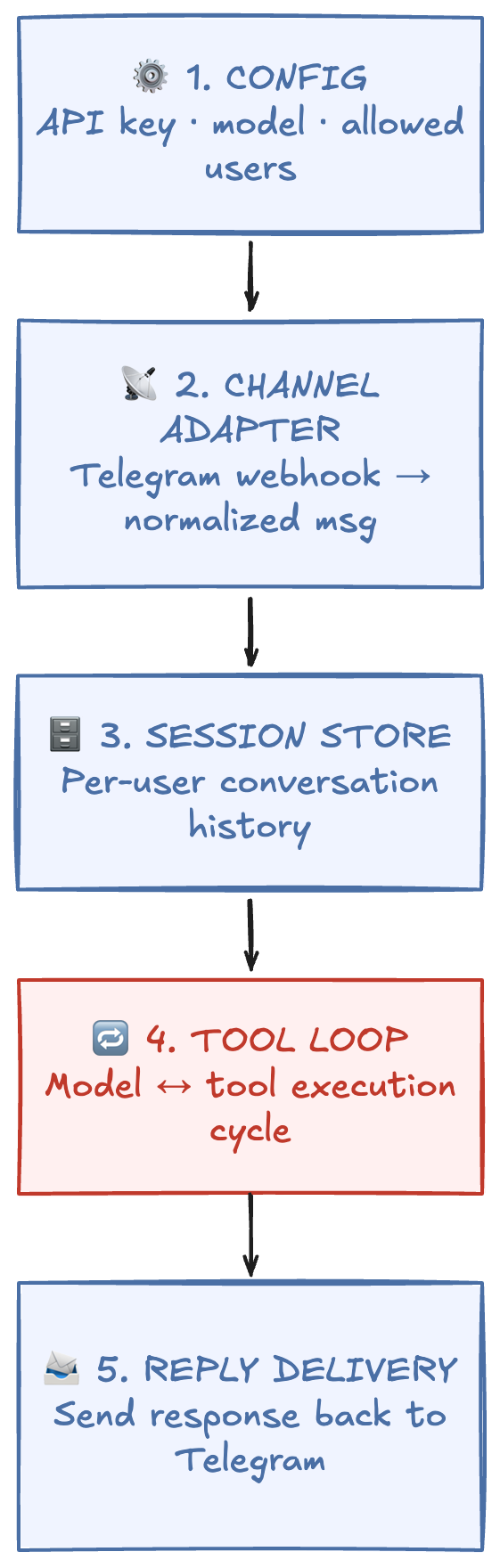
If you want to move faster instead of wiring every loop primitive by hand, LangGraph is a strong option. It is a low-level orchestration runtime for long-running, stateful agents, and its graph model is explicitly designed for cyclical control flow, which maps directly to the tool loop pattern. The LangGraph intro post calls this out as “cyclical graphs” for agent runtimes. One nuance: LangGraph can cover most of component 4 (tool loop) and part of component 3 (state/memory), but you still need to build channel adapters, routing boundaries, and reply delivery for a production chat system.
Let me walk through each one and how they connect.
Building it: five components, wired together
1. Config loader
The simplest starting point. A JSON or YAML file that holds your model provider, API key, system prompt, and an allowlist of Telegram user IDs that can talk to the bot.
{
  "model": "claude-sonnet-4-20250514",
  "provider": "anthropic",
  "apiKey": "sk-ant-...",
  "systemPrompt": "You are a helpful server assistant.",
  "allowedUsers": ["123456789"]
}
OpenClaw uses JSON5 with a much larger config surface, but this is the seed. The config is loaded once at startup and passed to every other component.
2. Channel adapter
This is the piece that turns a platform-specific webhook into a normalized message your system can process.
Telegram sends a POST request to your server with a JSON body containing the chat ID, user ID, message text, and attachments. Your adapter extracts the parts you care about:
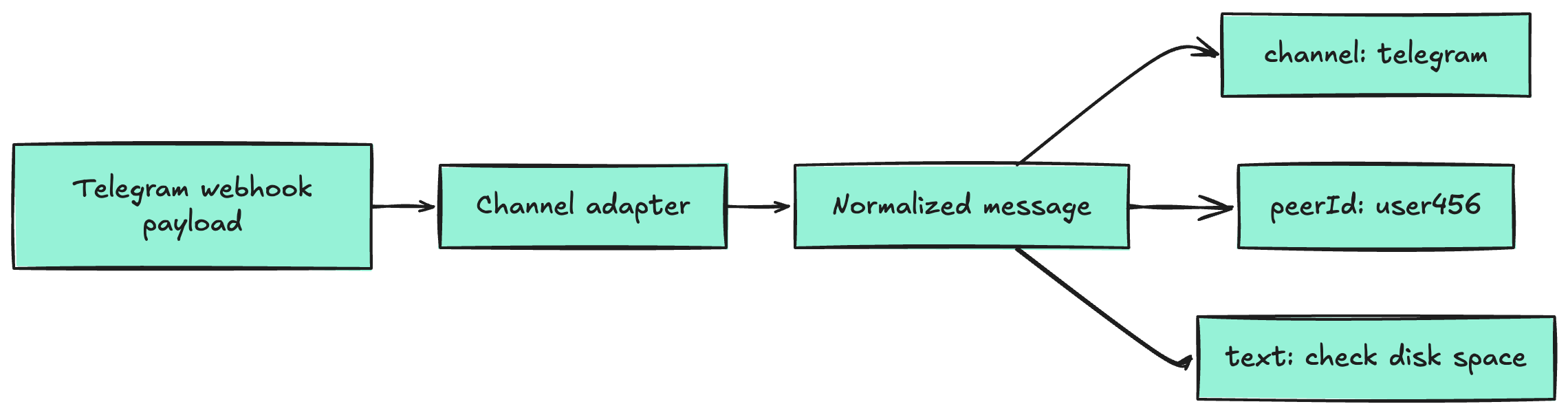
This boundary is a proven pattern in production bot systems. Rasa’s Custom Connectors make it explicit with an InputChannel and OutputChannel split: one side receives platform messages and forwards them in a normalized shape, the other side sends responses back to the platform (source).
For readers who want a simpler mental model, the Adapter pattern explains the same idea clearly: translate one interface into the format your core expects, so channel-specific quirks stay outside core logic (source).
The key design choice: the rest of your system never sees Telegram-specific data. It only sees the normalized message. This is exactly how OpenClaw does it — every channel plugin outputs the same shape, so the router and tool loop do not care whether the message came from Telegram, Discord, or a terminal.
That abstraction is what makes it possible to add a second channel later without touching the core.
3. Session store
Each user needs their own conversation history. The simplest version: one JSON file per user on disk.
When a message arrives from user 456, the system loads sessions/456.json, appends the new user message, runs the tool loop (which appends assistant and tool messages), and writes the file back.
That file is just the message array — the raw history you pass to the model on every turn:
[
  {
    "role": "user",
    "content": "check if my server has disk space left"
  },
  {
    "role": "assistant",
    "tool_calls": [{ "name": "exec", "input": { "command": "df -h" } }]
  },
  {
    "role": "tool",
    "content": "Filesystem Size Used Avail Capacity /dev/disk1s1 460G 210G 240G 47%"
  },
  {
    "role": "assistant",
    "content": "You have 240 GB free — 47% used. Looking healthy."
  }
]
Each turn: load the file, append the incoming message, send the full array to the model, collect the responses, append those too, write the file back. The write at the end is the whole trick — that is what gives the model memory on the next message.
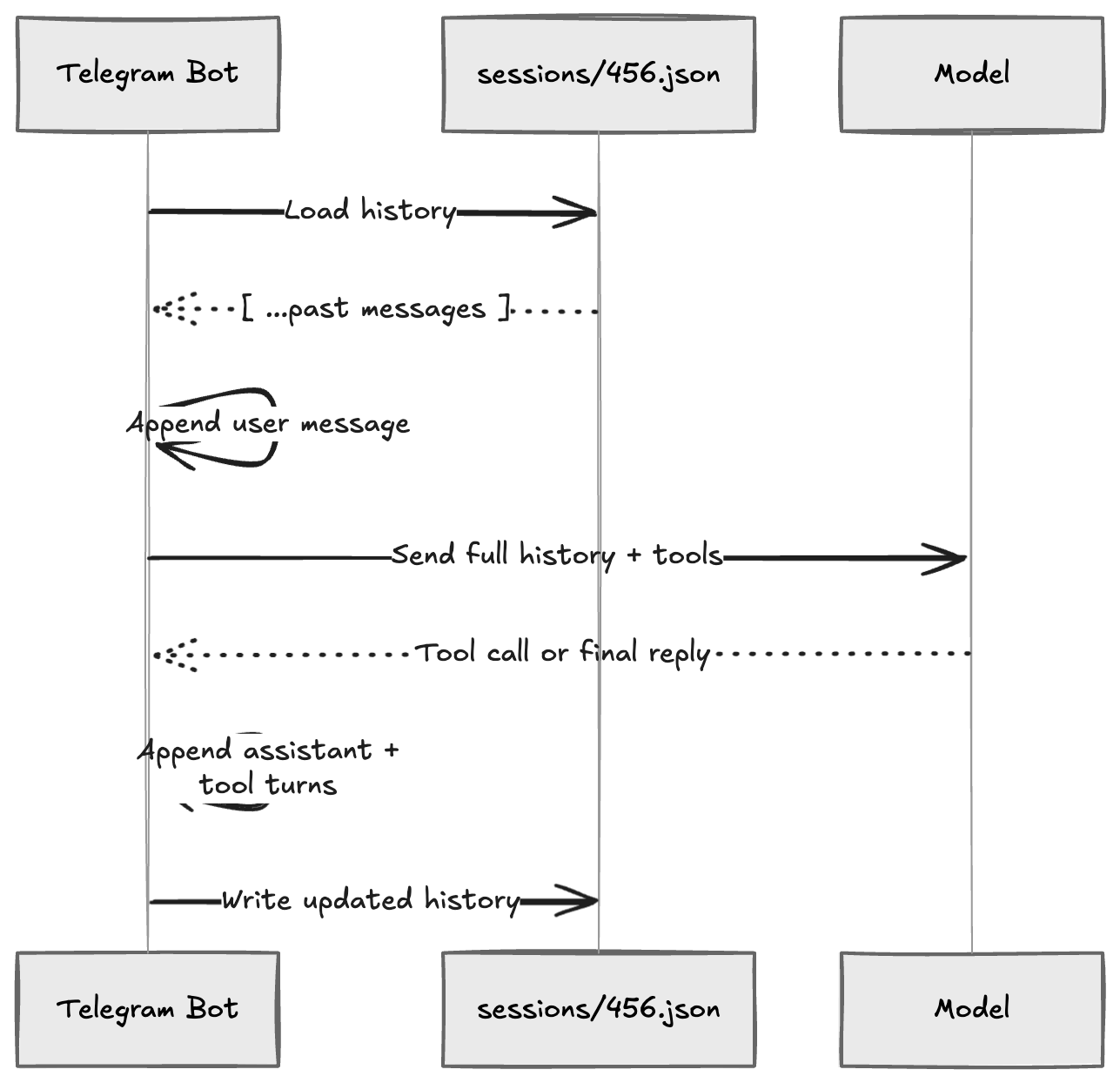
The critical detail OpenClaw gets right here is session identity. It builds a deterministic key from the channel, agent, and user: something like agent:main:telegram:direct:user456. That key drives the file path, a write lock (so two rapid messages from the same user don’t corrupt history), and the routing for replies.
For the minimal version, peerId as filename is enough. But keep in mind: the moment you add a second channel or a second agent, you will want a composite key. Design for it, even if you do not build it yet.
4. Tool loop — the actual agent engine
This is the core. Here is the flow:
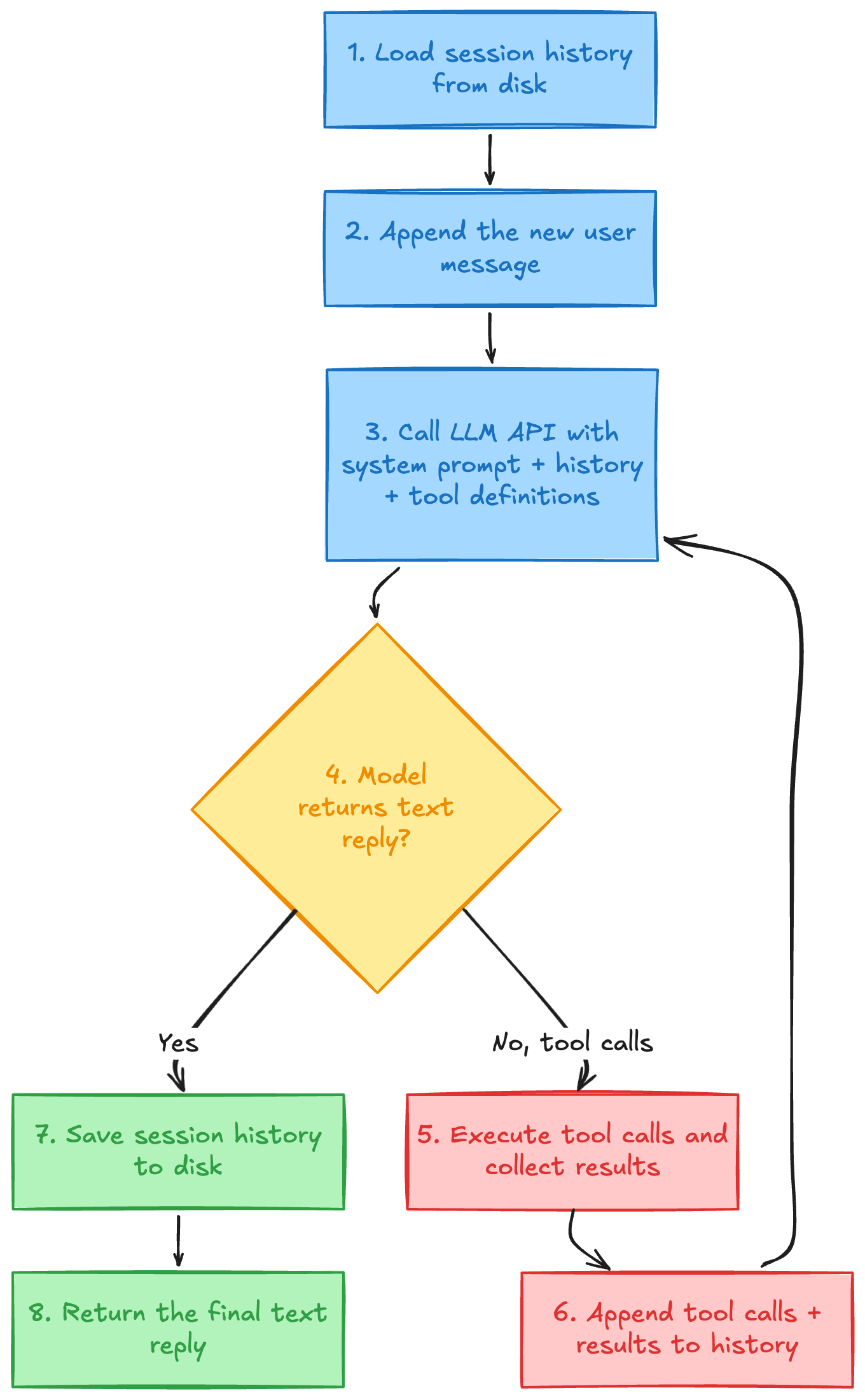
For our Telegram bot, we define one tool: exec. It takes a shell command string, runs it via a child process, and returns stdout + stderr.
Tool definition (sent to the model):
{
  "name": "exec",
  "description": "Run a shell command on the server",
  "input_schema": { "command": { "type": "string" } }
}
When the user asks “check disk space,” the model calls exec({ command: "df -h" }). Your tool executor runs that command, returns the output, and the model writes a friendly summary.
The loop part matters because the model might need multiple tool calls in sequence. “Read the log file, then grep for errors, then summarize.” Each round-trip feeds new information back to the model until it decides it has enough to answer.
OpenClaw adds significant machinery on top of this loop — context window guards, auth rotation, plugin hooks, loop detection, abort signals. You do not need any of that on day one. But you should know the loop is where all of it eventually lives.
5. Reply delivery
The tool loop produces a final text string. Your delivery layer sends it back through the channel adapter to Telegram’s sendMessage API.
The one gotcha even at the minimal stage: Telegram has a 4096 character limit per message. If the model writes a long reply (common when it pastes command output), you need a basic splitter. Start simple: split on double newlines, ensure each chunk is under the limit, send sequentially.
OpenClaw’s production chunker is far more sophisticated — it tracks Markdown fence spans so it never breaks a code block mid-message, and it reopens fences in the next chunk. That is a nice upgrade for later, but paragraph-boundary splitting handles 90% of cases.
How these five parts connect — and how each one expands
Here is the part I keep coming back to in the OpenClaw architecture: every component has a clean boundary, and every upgrade path is predictable.
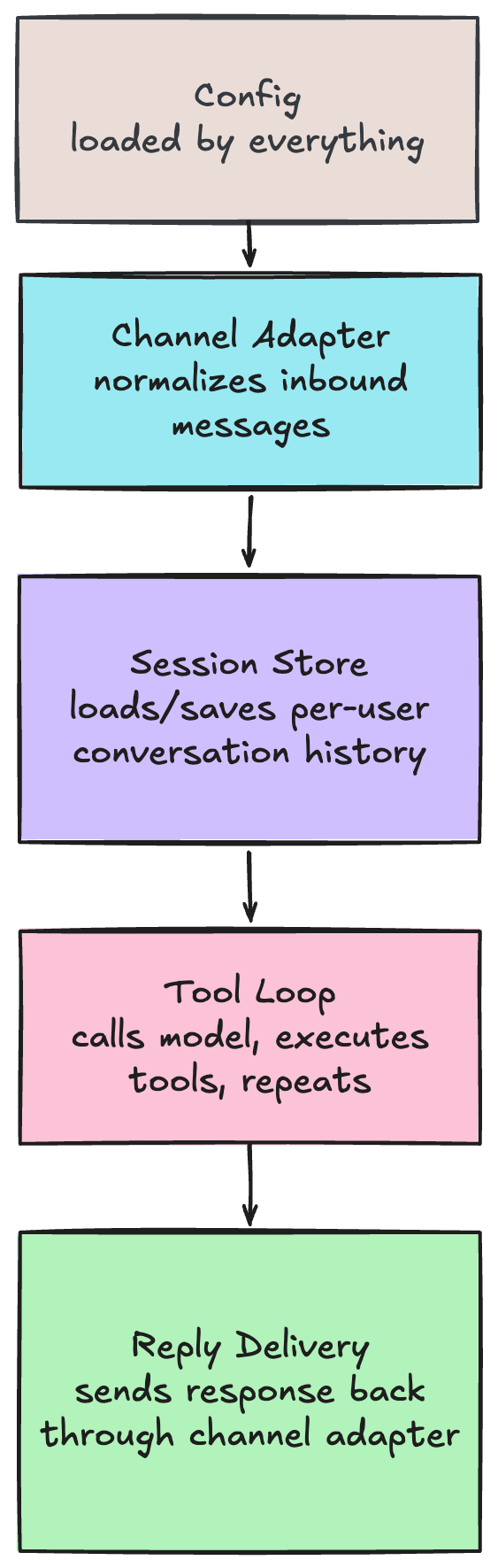
Now here is how each piece grows when you are ready:
Component Minimal version First upgrade Where OpenClaw ended up Config Single JSON file YAML with per-agent overrides JSON5 with bindings, profiles, plugins Channel Adapter Telegram webhook handler Add a second channel (Discord) 12+ channels via plugin system Session Store One JSON file per user Composite session key (channel + agent + user) Deterministic keys, write locks, lanes, subagent hierarchy Tool Loop model → exec tool → model Add read, write, web_search tools 15+ tools, plugin tools, MCP bridge, tool policies Reply Delivery Split on paragraph breaks Markdown-aware chunking Fence-tracking chunker, streaming partial delivery
The pattern is clear: each component starts trivially and can be replaced independently. Adding Discord does not require touching the tool loop. Adding a new tool does not require touching the channel adapter. Adding context compaction (summarizing old history when the context window fills) is a change inside the session store — nothing else needs to know.
That is not accidental. OpenClaw’s architecture is layered specifically so that complexity can be added without rewriting what already works.
The real challenges show up after the first version works
Building the five components is the easy part. Keeping them reliable is where the engineering gets interesting. There are a few major engineering problems that are not mentioned in the sections above.
Context overflow. Every model has a token limit. Long conversations and tool outputs fill it. OpenClaw solves this with compaction: when history reaches ~90% of the context window, a separate LLM call summarizes the old messages, and the session continues with the summary plus recent turns. Without this, long sessions just crash.
Concurrent users. Two users messaging your bot at the same time need isolated sessions. Two rapid messages from the same user need to be serialized. OpenClaw uses per-session write locks and command queue lanes. For a minimal version, you can add a simple mutex per session key.
API reliability. Rate limits, timeouts, provider outages. OpenClaw handles this with auth profile rotation: a pool of API keys tried in order, with cooldowns and exponential backoff. You probably do not need multi-key failover on day one. But you do need retry logic on your LLM calls, because providers fail more often than their status pages admit.
Tool safety. Giving a model exec access to your server is powerful and dangerous. OpenClaw has tool policies, sandboxing (Docker), and per-user restrictions. At minimum, run your tools in a sandboxed environment and limit which users can trigger them.
These are not features to add later. They are failure modes to be aware of from the start, even if you ship the simplest version first.
Final words
If you want to build a simple agent server, you can start with a simple architecture. The successful agent servers are all landing on the same shape: a persistent gateway, deterministic session routing, a tool-first execution loop, and thin clients on top.
The core architecture (receive message, route to session, run tool loop, deliver reply) is stabilizing. I am seeing more and more open source project converging into this shape.
If you want to learn, I would recommend you starting with a simple app where you can send a message from your Whatsapp/Telegram to your agent server and let it call a tool to take a screenshot of your computer and send it back to you. From there you can gradually add more features and tools to your agent server.
Have fun hacking.